Sample rate
How many samples are taken each second, measured in hertz (Hz). Audio CDs use 44.1 kHz, or 44,100 samples per second for each channel.
Explore how computers turn sound waves into binary data. Compare sample rates and resolutions, work out the size of an uncompressed recording, and practise exam questions with revealable mark schemes.
Sound travels as vibrations. The amplitude of the wave can vary continuously, so the signal is analogue. A computer measures the amplitude at regular time intervals and stores the results as discrete binary values.
Follow one measurement from the sound wave to the binary value stored by the computer.
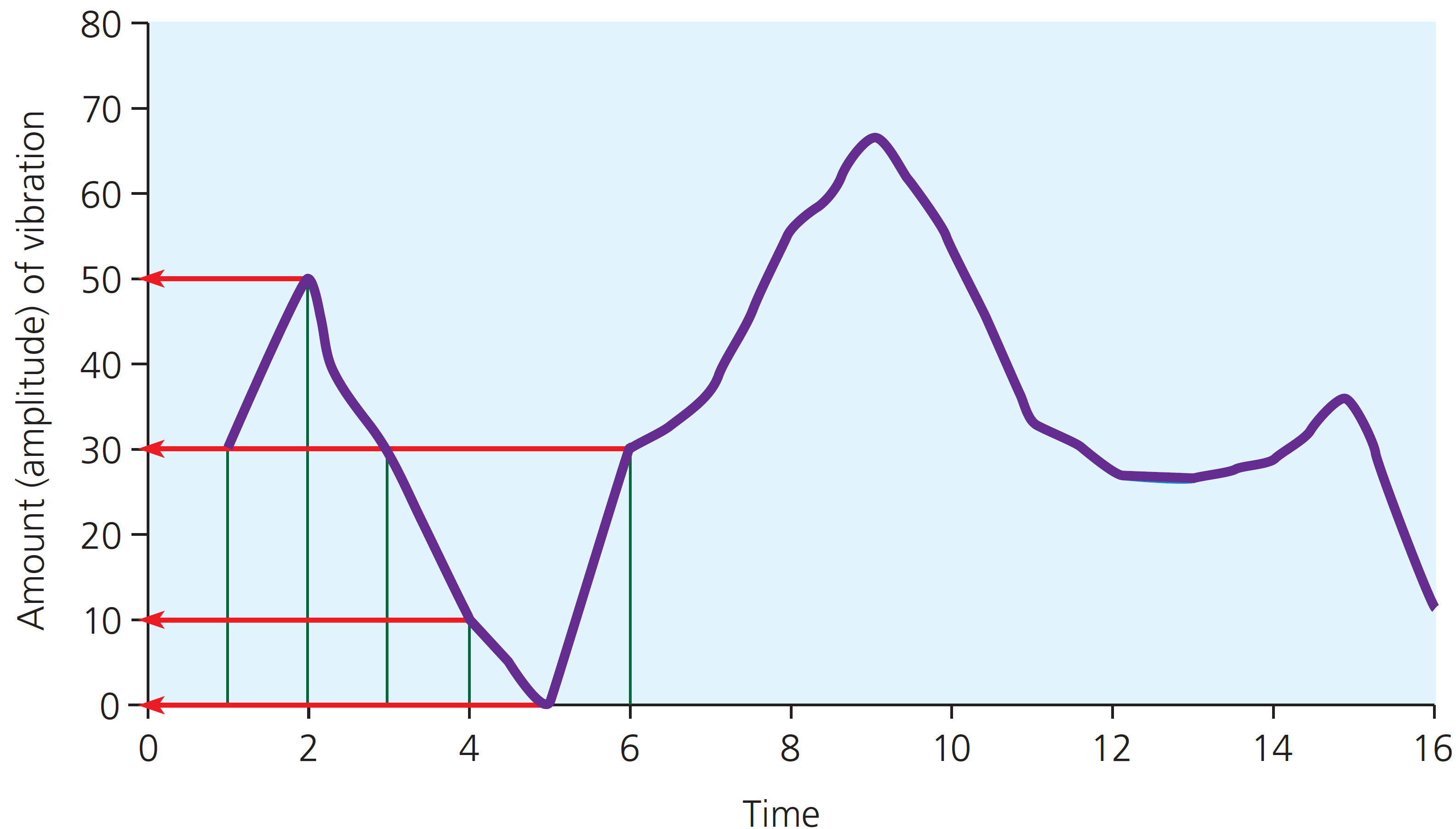
At 2 seconds, follow the vertical guide up to the wave, then across to the amplitude axis. The graph shows a value of 50.
Time: 2 s · Measured amplitude: 50
| Term | Meaning | What to look for |
|---|---|---|
| Analogue | A signal with values that vary continuously. | The smooth curve shows how the amplitude changes over time. |
| Amplitude | The size of the vibration at a point in time. | Read amplitude on the vertical axis and time on the horizontal axis. |
| Sample | A measurement of amplitude at a particular instant. | Each dot on the sampling graph corresponds to one measurement. |
| Discrete | Separate, distinct values. | Each measurement is rounded to an available level and represented in binary. |
Sampling once per second can miss changes between measurements. Rounding each value to the nearest ten loses more detail. Compare that example with two samples per second rounded to the nearest one.
Load a textbook example or change one setting at a time to see its effect on the graph.
The preview maps the shape of the wave to pitch so you can hear a smooth sweep alongside a stepped one.
The replay follows the overall shape, but loses changes between samples and rounds the amplitude.
The smooth curve is illustrative. In the coarse example, the stored values at 1–6 seconds match Figure 3.6.
| Time | Original amplitude | Stored amplitude | Rounding error |
|---|
How many samples are taken each second, measured in hertz (Hz). Audio CDs use 44.1 kHz, or 44,100 samples per second for each channel.
The number of bits used to store one sample. A CD uses 16 bits per sample, giving 65,536 possible amplitude levels.
Longer recordings contain more samples. Stereo stores two channels and uses twice as much space as mono at the same rate, resolution and duration.
Select a bit depth to see how many amplitude levels can be represented in each sample.
A typical audio CD stores each sample using 16 bits.
More levels reduce the amount of rounding needed to represent each measurement.
| Increase | Effect on playback | Effect on uncompressed size |
|---|---|---|
| Sample rate | Captures changes at shorter intervals and can reproduce more detail. | More samples are stored per second. |
| Sample resolution | More amplitude levels reduce rounding error. | More bits are stored for each sample. |
| Duration | Plays for longer at the same recording settings. | More seconds of samples are stored. |
| Channel count | Each channel carries a separate stream of sound. | Samples are stored for every channel. |
Start with the sample rate in hertz and duration in seconds. Multiply by the number of bits per sample and the number of channels to get the size of the uncompressed sample data.
Size in bits = sample rate × sample resolution × duration × channels
Divide by 8 to get bytes, then divide by 1,000,000 to get megabytes (MB). Use one channel for mono and two for stereo.
Try a worked example or enter your own settings. Show each conversion when you answer an exam question.
Review the definitions, the two ways of improving sampling accuracy and the unit conversions before attempting the questions.
| Example | Working in bits | Size after conversion |
|---|---|---|
| 1 minute of CD-quality mono | 44,100 × 16 × 60 = 42,336,000 | 5,292,000 bytes ≈ 5.29 MB |
| 1 minute of CD-quality stereo | 44,100 × 16 × 60 × 2 = 84,672,000 | 10,584,000 bytes ≈ 10.58 MB |
| Knowledge Check 33 | 1,000 × 8 × 30 = 240,000 | 30,000 bytes = 0.03 MB |
Draft your own answer, then select Reveal solution & explanation. Check your response against the marking points and mark the question as mastered or flag it for review.